Purchase Order Form Experiment
Purchase Requisition
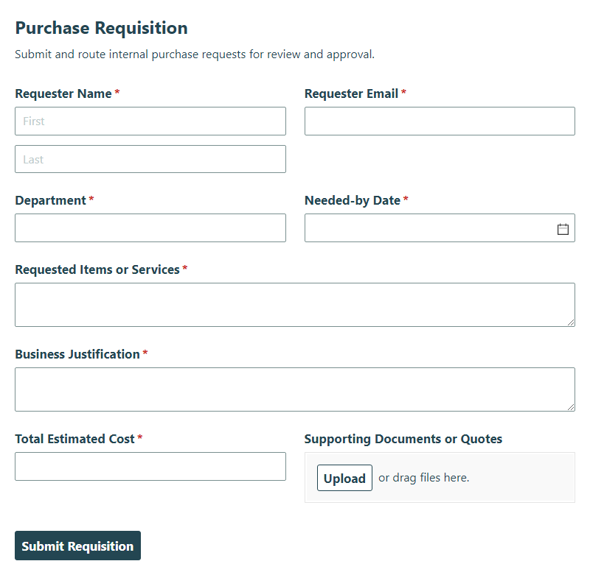
Collect internal requests to buy goods or services and route them for approval with the Purchase Requisition template, keeping purchasing requests organized from submission to review.
Preview
Use a purchase order form to collect item requests, calculate line-item totals, and route approvals without rebuilding the same process in spreadsheets or email. Cognito Forms lets teams create order workflows with repeating line items, calculated totals, and multi-signature approval fields for purchasing, service work, and project changes.
About Purchase Order Forms
Purchase order forms help teams collect the details they need before money is spent, work begins, or a project scope changes. Instead of chasing requests through email, Priya can give her team one structured place to submit vendor details, requested materials, quantities, pricing, delivery notes, and approval signatures. That creates a clearer record for purchasing, operations, finance, and leadership.
With Cognito Forms, you can build purchase order forms that support calculated totals, repeating sections for line items, and signature fields for multi-party approval. A material purchase order can total parts automatically. A supply order form can standardize requests for inventory or office materials. A work order form can capture service location, priority, labor hours, parts, and technician sign-off. A change order form can document contract adjustments, cost impact, schedule impact, and revised project totals.
This page focuses on purchase, work, and change order workflows. Sales order form, wholesale order form, and basic sales templates can support related order processes, but the strongest fit is internal or B2B order collection where accuracy, approvals, and clear records matter.
Online purchase order forms give your team a consistent way to request, review, and approve orders. Instead of manually checking totals, copying details into spreadsheets, or searching for the latest email thread, you can collect every request in the same format and keep the submission record in Cognito Forms.
For managers like Priya, that means fewer missing details and a clearer approval path. For small business owners like Taylor, it means customers, staff, or vendors can submit order information without extra back-and-forth.
- Missing order details. Require vendor, requester, project, delivery, and item information before someone submits the form.
- Manual total errors. Use calculated fields to add line-item totals, labor, materials, taxes, discounts, or revised project totals.
- Unclear approvals. Collect client, manager, contractor, or technician signatures on the same submission.
- Inconsistent work requests. Standardize work order forms with priority levels, service locations, assigned technicians, and completion estimates.
- Scope change confusion. Use a change order form to document what changed, why it changed, and how the change affects cost or schedule.
- Scattered records. Keep order submissions organized in one place so teams can review, export, or follow up as needed.
Operations, procurement, construction, maintenance, sales, and service teams all benefit from structured order forms. Priya can use a purchase order form to standardize internal requests before they reach finance. A project manager can use a change order form to document scope changes and approvals. A service manager can use work order forms to assign jobs, estimate labor, track parts, and collect technician signatures.
Taylor may use the same structure for a smaller team, such as collecting wholesale order details, supply requests, or customer sales orders without building a custom process from scratch.
After someone submits an order form, Cognito Forms stores the entry so your team can review the request, confirm totals, and follow up with the right people. You can route confirmation emails, export entries, and use form settings to keep the process organized.
For more detailed order workflows, add calculated totals, repeating sections for parts or materials, and signature fields for approval. That gives your team a cleaner handoff from request to review, approval, fulfillment, or project documentation.
How to Create a Purchase Order Form With Cognito Forms

Use a template
Start with the closest purchase order template, then customize the fields, labels, calculations, approval signatures, and confirmation settings for your purchasing process. Use a material purchase order template for itemized requests, or adapt a sales order template when you need customer-facing order details.

Describe what you want with AI
Use the AI Form Generator to describe the purchase order form you need, such as a purchase order with vendor details, a work order with priority levels and parts, or a change order with cost and schedule impact. Then review the generated form and adjust the fields to match your workflow.

Start from scratch with drag-n-drop
Build your purchase order form manually when you need full control over layout, fields, logic, calculations, repeating line items, and signature fields. Add sections for request details, vendor information, materials, labor, totals, approval, and internal notes.
Frequently Asked Questions
A purchase order form should include requester information, vendor details, item names or descriptions, quantities, unit prices, calculated totals, delivery details, approval signatures, and any internal notes your team needs for review.
Yes. You can use calculations to total line items, labor, materials, taxes, discounts, or revised project amounts. This helps reduce manual math errors and gives reviewers a clearer order total before they approve the request.
Yes. Use repeating sections to let people add multiple items, parts, or materials to one submission. This works well for material purchase orders, supply order forms, wholesale order forms, and work order forms that need itemized details.
A purchase order form usually requests approval to buy goods or services. A work order form usually assigns or documents service work, maintenance, repairs, or field tasks. Work order forms often include service location, priority level, assigned technician, labor hours, parts, total cost, and signatures.
A change order form documents changes to an approved project or contract. It typically includes the project name, change order number, description of the change, reason for the change, cost impact, schedule impact, revised project total, and approval signatures.
Yes. Add signature fields when a purchase order, work order, sales order, or change order needs approval from a client, manager, contractor, technician, or other reviewer.
Yes. You can customize a sales order form with customer details, PO numbers, shipping information, payment terms, product line items, totals, and approval fields. If your team also uses a basic sales form, keep the two templates clearly labeled so users understand which one fits their process.
Create a form with AI