
The most convincing scam form you’ll ever see won’t look like a scam at all.
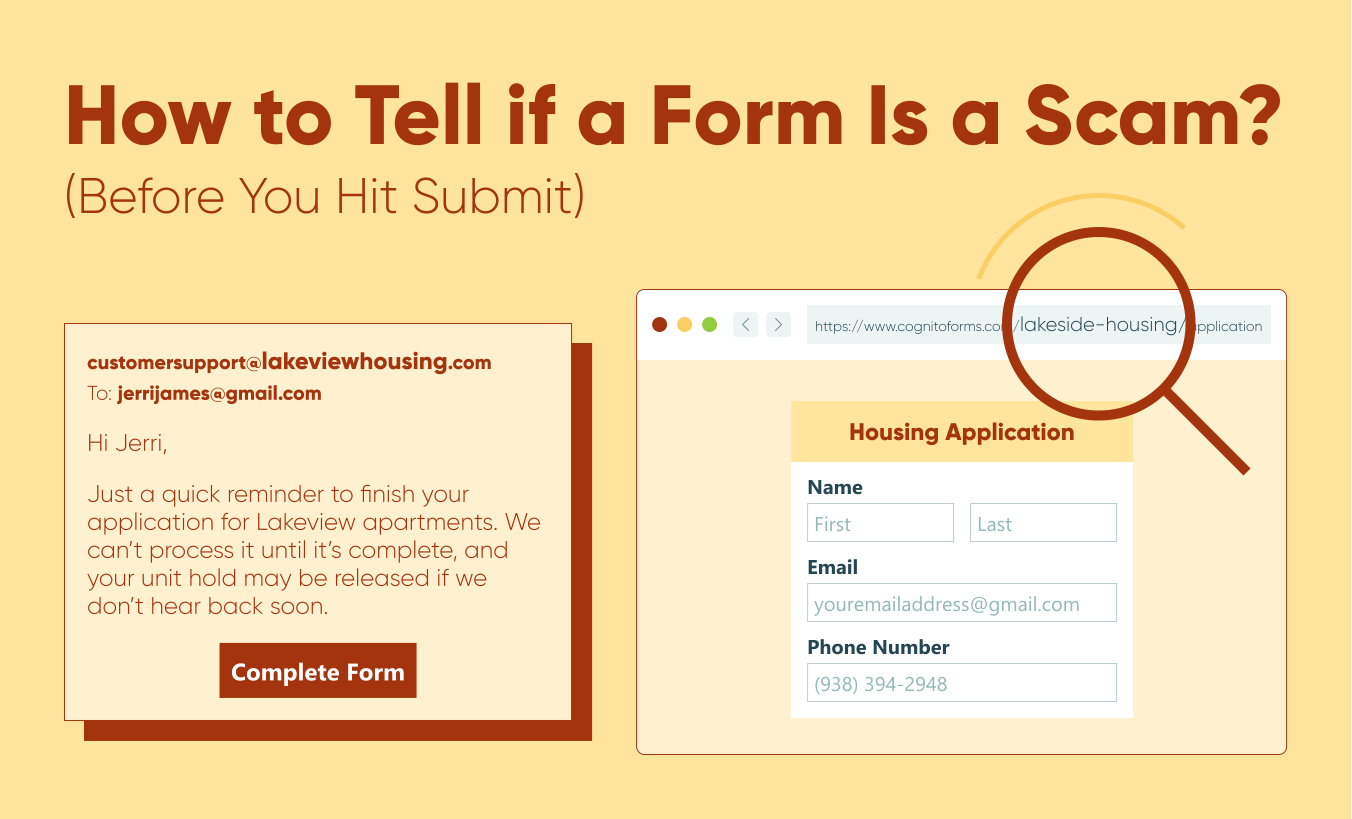
Online forms have become the standard in data collection, and most people fill them out without a second thought - job applications, payment confirmations, and password resets. That automaticity is exactly what scammers exploit.
Scam forms don’t (most of the time) look dangerous. They look familiar, borrowing trusted platforms, recognizable branding, and everyday language to get you to share information before you realize something is wrong.
The good news is that you don’t need any technical skills to spot one. This blog walks you through the key red flags, how to verify a form before you submit, and what to do if you’ve already shared sensitive information.
Start Here: “Was I Expecting This Form?”
Recognizing a scam isn’t about knowing what platforms are safe; it’s about paying attention to the request itself. Because of the well-known names that host forms, you might feel more relaxed and overlook details, focusing on the channel rather than the content. Yet the single most important question you can ask is: “Was I expecting this?”
The biggest red flag is an unexpected request for your personal or financial information. Scams come through channels you use every day, including text and email. A simple pause and investigation catches most phishing attempts.
Be wary if you haven’t taken any steps to initiate a company’s request for information, such as creating an account, starting a purchase, or contacting support. If you haven’t, treat it with a healthy amount of suspicion until you verify the request.
Signs a Form Might Be a Scam
“Act now!” “Your account will be TERMINATED.” “Handle this discreetly!”
Scams vary in their level of execution. Some forms mimic legitimate businesses you often engage with, while others clearly appear to be scams. We will cover all the key signs to look for to identify a scam.
The messaging creates pressure
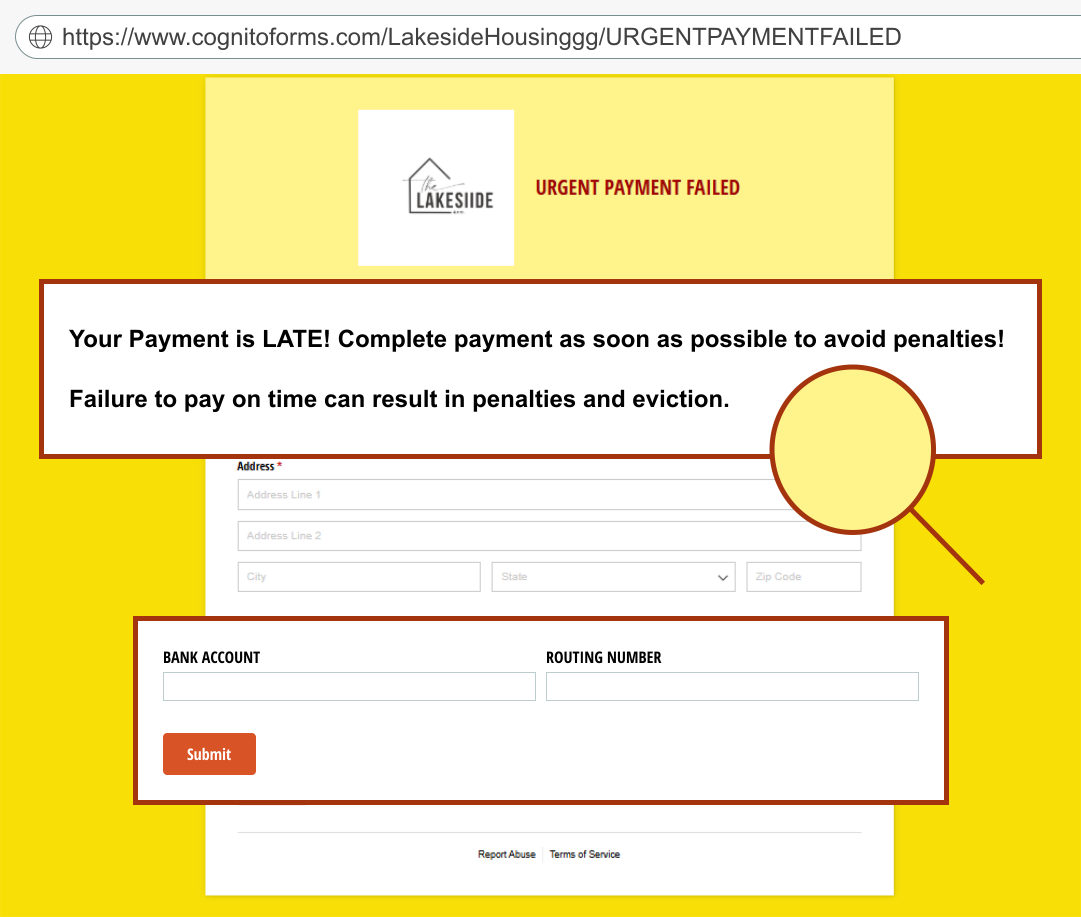
Messages claiming someone must take urgent action right away are scams. Watch for time-sensitive demands, threats, or requests for secrecy. A genuine organization may occasionally use urgent language, but it’ll always provide context for the request. Scammers rely on putting you in a panic to knock you off your game. If you are panicked, you stop asking whether it’s real and focus instead on fixing the issue at hand. Phishing scams capitalize on these realistic requests that, if you don’t take a second to think about and verify, lead you to submit sensitive information.
It asks for more than the situation requires
When what they are asking for doesn’t match its stated purpose, that’s a reliable signal that something is wrong. A shipping confirmation asking for your login credentials, or a survey requesting your Social Security number, are examples of mismatches in intent that no legitimate request would have.
It discourages verification
Requests like “Do not call” or “Do not email support” are intended to prevent you from confirming the request yourself. Authentic requests from organizations will never discourage you from reaching out for support or to double-check.
The details don’t add up
Check the branding, language, and sender details carefully. Scams often display inconsistencies such as awkward grammar, incomplete form fields, mismatched logos, missing branding elements, or organization names with extra or missing characters. While each issue might seem small on its own, together they create a pattern that users must take seriously.
The recipient’s identity is vague
If you receive a form request in your inbox addressed to “Dear Customer” instead of your name, or if the form does not clearly specify a sender or organization, it likely indicates a mass phishing attempt rather than a legitimate, targeted request from a company that recognizes you.
It asks for high-risk information without context
Unsolicited requests for personal, high-risk information are a significant red flag. Common examples of high-risk information include your mailing address, account login credentials, Social Security number, and credit card/financial information. Authentic requests for sensitive data do so in a secure, encrypted environment with clear context, not via an unsolicited message.
Steps to Check for Fraudulent Forms
Scams are increasingly sophisticated. They look real, they sound real. Scammers use believable explanations to make it seem vital and urgent to provide your information.
When you encounter a potentially suspicious form, a few checks go a long way:
-
Go to the company’s website manually
Links can be deceiving. Instead of clicking the link they provided, manually type it in your browser or go to the company’s website to find the form. You can also hover over the link to see the URL. The text may appear legitimate, but the actual URL may redirect you to another site. Some phishing links include unique tracking parameters to identify who clicked them and tailor follow-up attacks.Examples:
Legit website URL Scam URL companyname.comcompanyco.aicompanyname.com/shippingidcompanyco.ai/shipping/utm_campaign=email&id32454 -
Check the sender and the reply-to address
If you receive a request through email, the from and reply-to addresses may not always match. Some legitimate emails are sent through third-party platforms, so the from address might use a different domain even though the reply-to address points back to the real company.Examples:
Legit email Scam email from: Company Name notifications@formcompany.comfrom: Company Name notifications@companynnameco.netreply-to: support@companyname.comreply-to: co@companyco.net -
Verify URL
Every form software company’s URL follows a consistent structure, likeformcompany.com/organization-name/form-name. If someone is impersonating a real organization, the URL will contain small variations. Examples of this are extra letters, a misplaced hyphen, or a substituted word—anything that doesn’t match the real organization’s name.Examples:
Legit URL Scam URL formscompany.com/companyname/Invoiceformcompany.com/companynameeco/invoiceformcompany.com/companyname/AccountRegistrationformcompany.com/companyyname/AccounttRegistration -
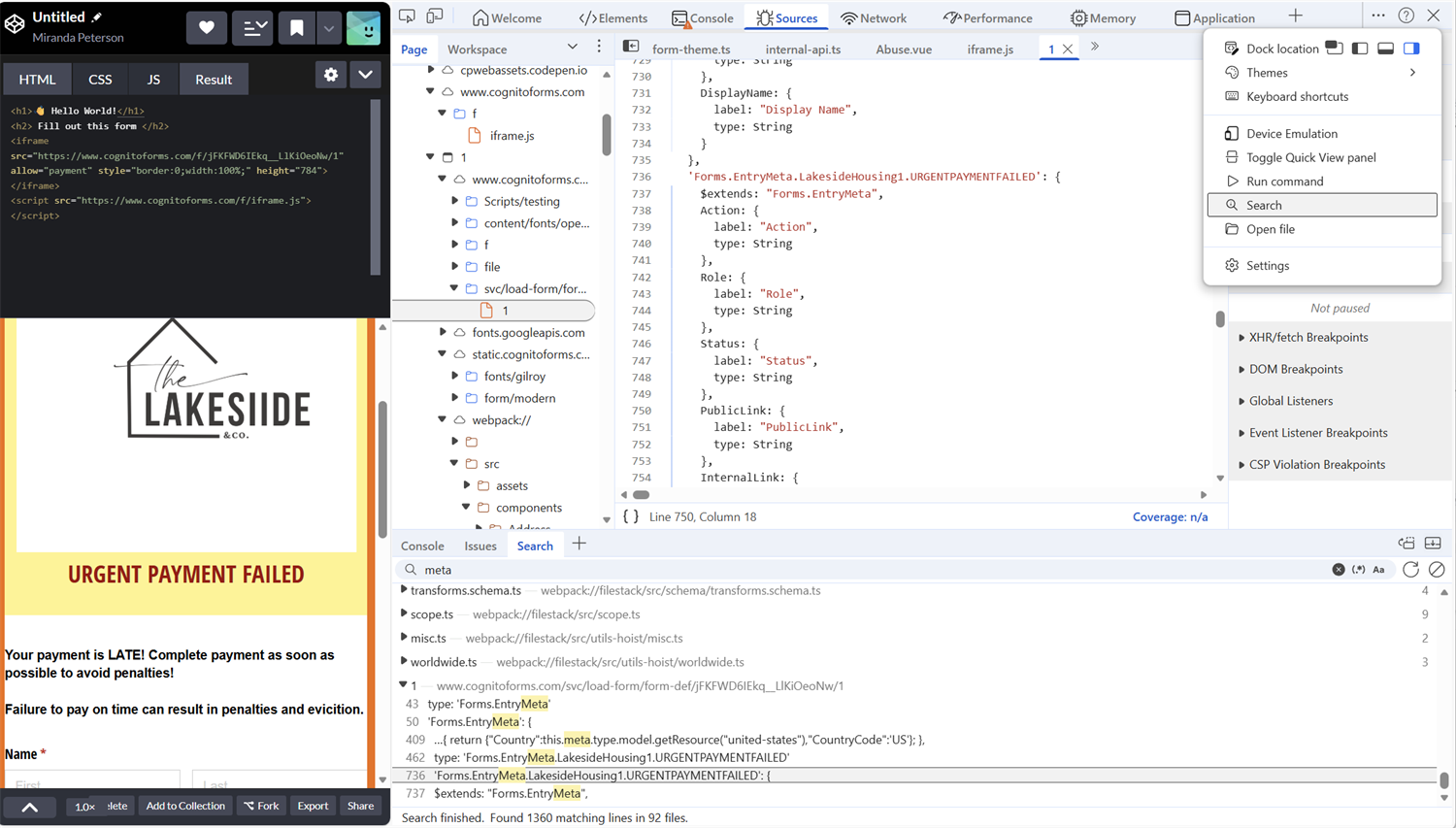
Verify embedded forms within the code
If a form is embedded in a webpage with a hidden URL, verify the source using your browser’s developer tools. Open developer tools, access the three-dot menu, select search, and type the organization’s name. In JavaScript, you’ll see the first three to four letters of the organization and the form name.Forms.EntryMeta.OrganizationName.FormName
If these are missing, changed, or linked to an unknown account, do not submit anything.
-
Confirm through a known channel
Identify the requesting company’s contact information outside of the request. If it’s legitimate, you’ll find their information easily, allowing them to provide more details. For large companies, log in to your account to review activity and contact support through email, chat, or phone.Examples:
Legit request Scam Request Nonprofit company collecting donations Fake nonprofit company collecting donations Basic information can easily be found on their website or through a web search, which provides testimonials and certification of legitimacy. Social media account only, no website, or email available, or any information on how your donation will be used.
If you encounter a suspicious Cognito Forms form, our support team is ready to assist. Submit a support ticket, and they will be happy to investigate the organization before you submit any information.
I Think I’ve Been Scammed: What Do I Do?
It can happen to anyone. If you have completed a form that you believe may be a scam, here are some preventive measures to take, depending on what you shared.
If you shared basic information
If you provided basic information, such as your name, phone number, or email address, stay alert for follow-up phishing attempts. Scammers may use that information to send more convincing messages targeting your accounts.
Change reused passwords and enable multi-factor authentication (MFA) wherever possible. MFA requires a second confirmation from a channel only you control, making it significantly harder for attackers to gain access even if they have your credentials.
If you shared financial information
If you provide a bank account number or credit card information, contact your bank or card issuer immediately. They can help you with the next steps to protect your account. This may include placing a fraud alert or freezing credit card accounts as needed. Once you’ve done this, monitor your accounts closely for unusual activity.
What to Do Next
If you encounter a scam or phishing attempt, report it to the platform. Your report makes a real difference. When you flag a scam, companies can investigate and suspend those accounts before someone else gets targeted.
At Cognito Forms, we treat any misuse of our platform very seriously. We actively monitor for suspicious activities and allocate significant resources to shut down groups that attempt to harm people on our platform. (In fact, we have a human team and cool software dedicated to tracking down the bad actors.) To report a scam, just fill out this form here.
For form builders, the best defense starts before anyone fills out your form. Clear organization names, honest explanations of why you’re collecting data, and transparent practices are what separate trustworthy forms from the untrustworthy ones.
FAQ
No, but scammers use them. The platform isn’t the risk; the intent is. Forms are tools, and like any tool, they can be misused.
Usually not directly, but it can lead to identity theft, account takeovers, or targeted phishing using your real information.
No. HTTPS only means the connection is encrypted, not that the form owner is trustworthy.
Look for the organization name, form name, and the platform it’s hosted on (such as Cognito Forms). You can then verify the organization independently before submitting anything.

Miranda Peterson
Miranda is a Marketing Specialist at Cognito Forms who loves turning complex ideas into content that’s clear, helpful, and human. Outside of work, you can find Miranda enjoying local coffee shops, spending time in nature with her husband and two children, reading on her Kindle, or cooking for a group of friends.