Streamline Registrations
with Automated Workflows and Instant Notifications
Build professional registration forms that do the heavy lifting for you. From the moment someone registers for your conference, workshop, webinar, or membership program, automated workflows take over—sending confirmations, scheduling reminders, and keeping everyone informed.
Trusted by Thousands of Event Organizers
From community non-profits to Fortune 500 companies, organizations worldwide rely on Cognito Forms to simplify event sign-ups.



Effortless Registration Forms
Build forms fast – no coding needed
Use our drag-and-drop builder and pre-built templates to create professional registration forms in minutes, from simple contact forms to complex multi-page applications.
Customize the customer experience with powerful conditional logic
Show or hide fields, create branching paths, and calculate fees automatically based on user responses to deliver a personalized, streamlined registration experience.
Collect payments
Accept credit cards and digital payments directly in your forms with integrated payment gateways such as Stripe, PayPal, and Square, including support for subscriptions, payment plans, and discount codes.
Embed and share registration forms
Seamlessly embed forms onto your website, share direct links across email and social media, and deliver fully responsive, mobile-optimized experiences on any device.
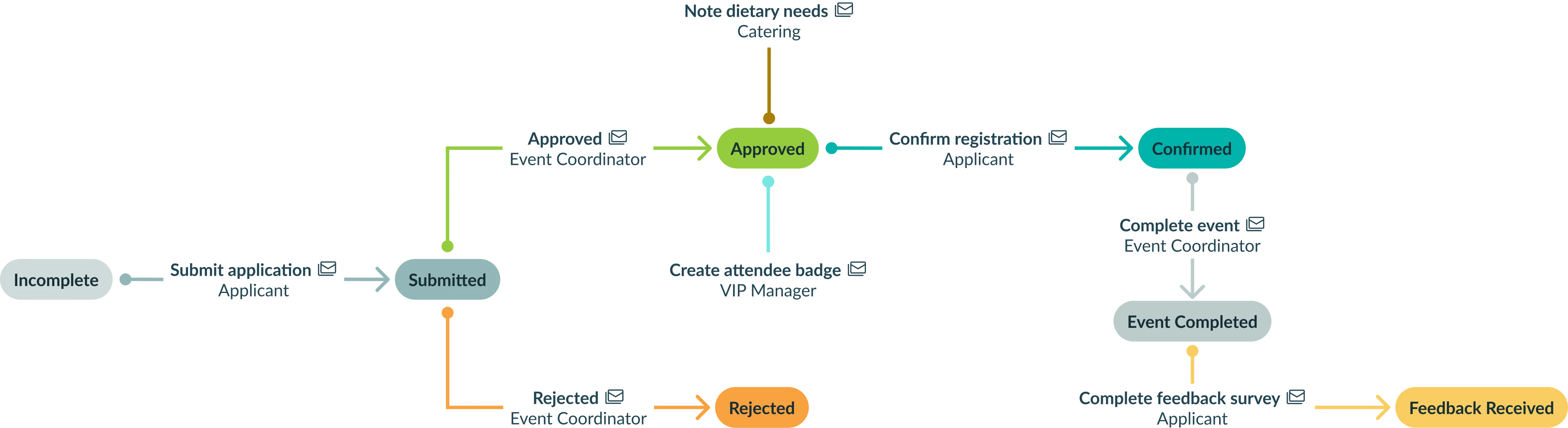
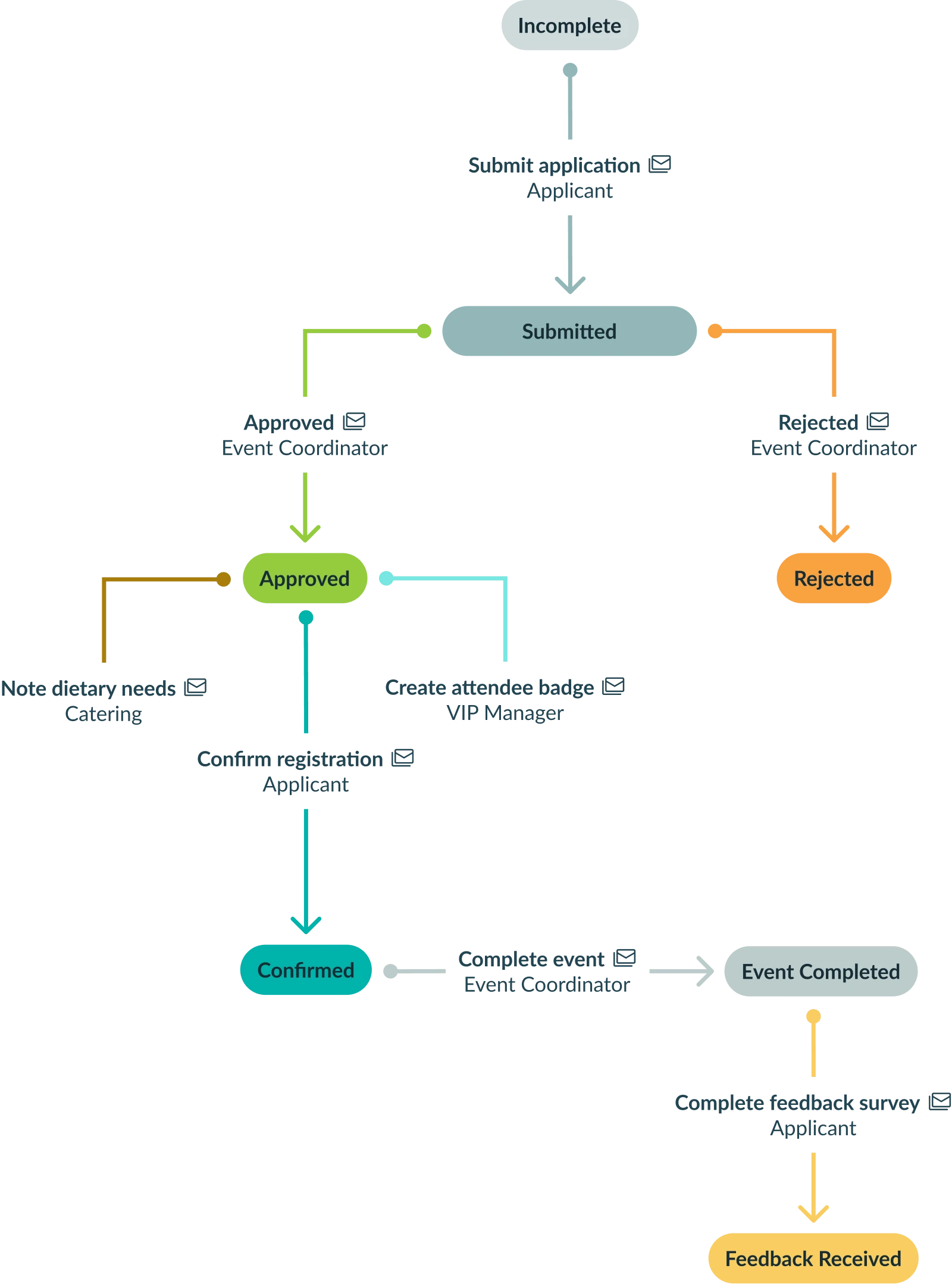
“Set It and Forget It” Workflow Automation
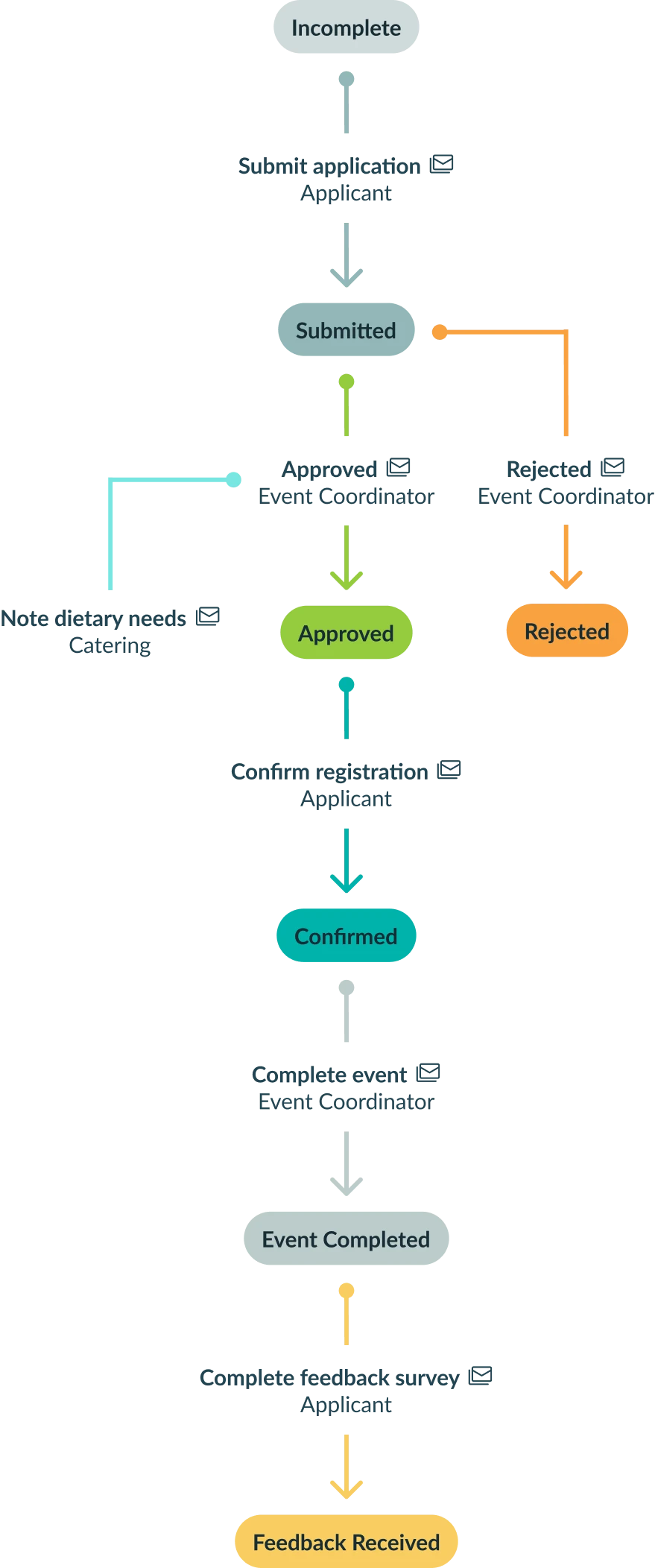
Turn registrations into a smooth end-to-end attendee journey that practically runs itself. By automating repetitive steps, event organizers report significantly reduced administrative time. Set it up once, and let the form handle the confirmation emails, reminders, and data routing while you focus on the event itself.
Accept Payment in Your Event Registration Form
Create a seamless sign-up experience by collecting attendee details and payment in one place. Follow this step-by-step guide to build a registration form that accepts payments and automatically confirms registrations.
Save Hours of Manual Work
Without automation, expect 6% of registrants to email questions. Plus, your team will spend countless hours downloading spreadsheets and organizing data across disconnected tools.
Use the slider to see exactly how many hours Cognito Forms' automated confirmations, reminders, and self-service features give back to your team.


Simple, easy to use, professional, time saver!
"I run a 'by appointment' small business and need to get my clients to complete a client registration form. I am not very tech savvy and I found Cognito Forms through my partnered Square Appointments booking app. I have been extremely impressed at how easy it was to create a simple form and now send it in advance to all my new clients to complete before their first appointment. It has simplified my life and customers also find it efficient and professional. Thank you so much Cognito Forms!"
Joanna
Read full review
Easy to learn & AMAZING Support
"I have been using Cognito Forms for a high school reunion registration. It was easy to figure out how to build a form and configure which fields you can collect money from. People who registered found it to be easy as well…I will absolutely use Cognito Forms again for any future needs where it will be useful."
Anna
Read full reviewAutomatic Confirmations & Reminders
Never leave attendees wondering if their registration went through. Send instant, personalized confirmation emails the moment someone registers, and schedule automated reminders to reduce no-shows—all without lifting a finger.
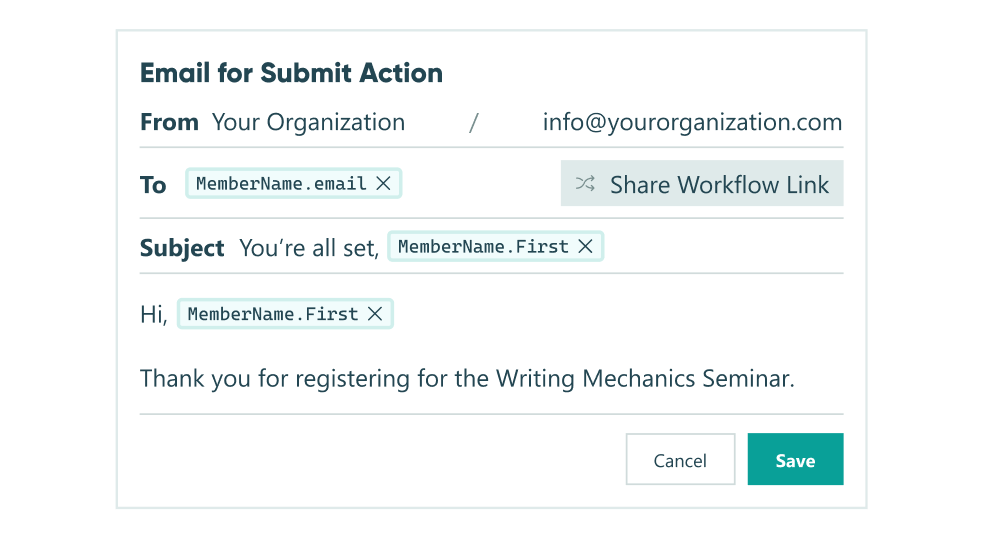
Instant customized confirmations
Design branded emails that include attendee details, event information, payment receipts, tickets, and calendar invites, sent automatically upon submission.
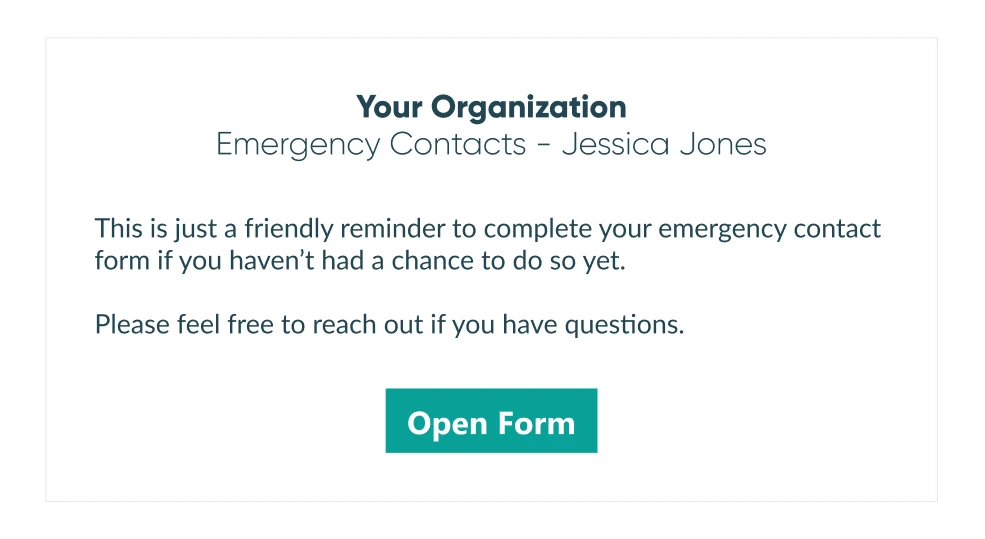
Scheduled reminder emails
Set reminders to go out one week before, 24 hours prior, or on any schedule you choose, putting your event top-of-mind.
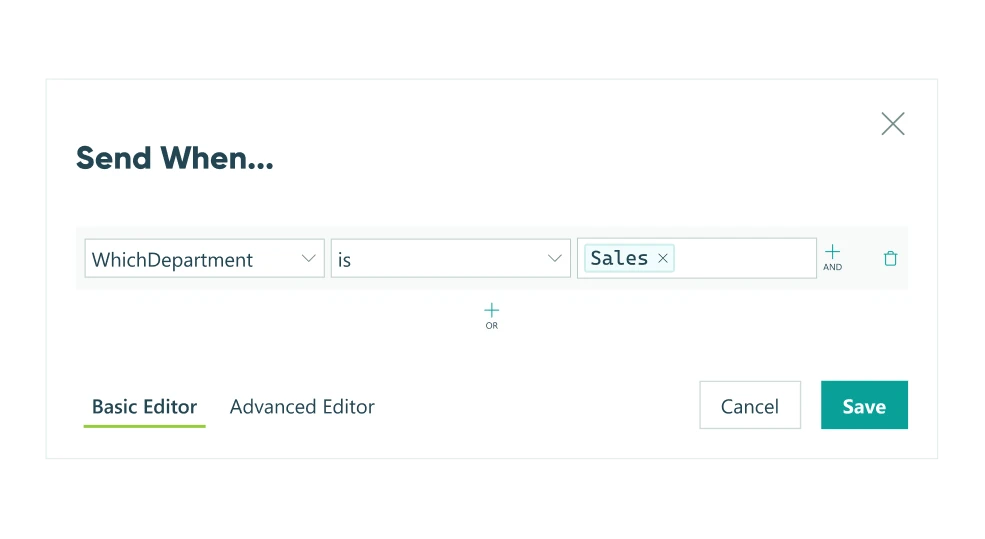
Conditional alerts
Trigger specific notifications based on registration type, payment amount, or attendee category—ensuring the right people get the right information.
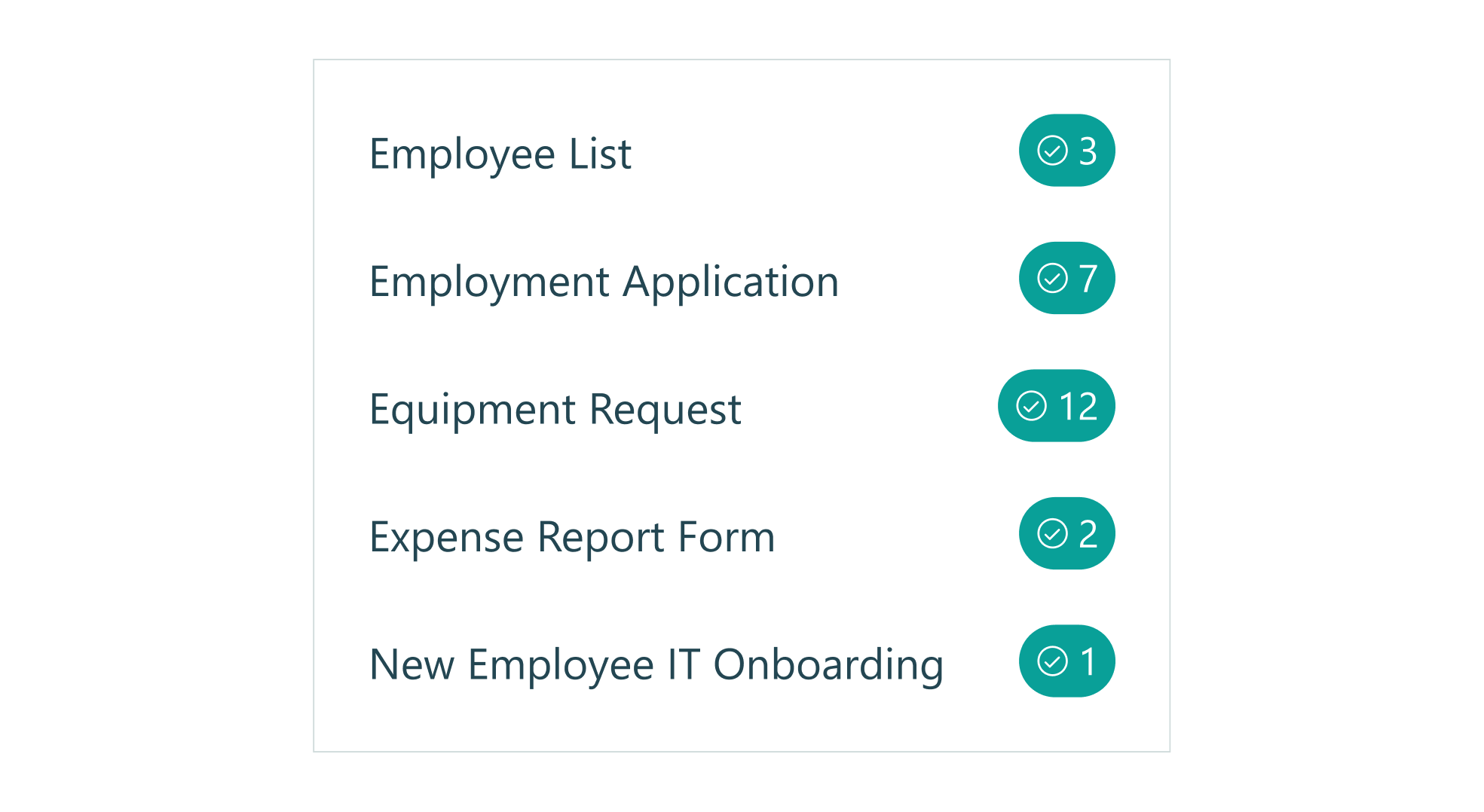
In-app task assignments
Each team member's dashboard displays all tasks automatically assigned to them based on registration submissions, leaving your event workflow organized and accountable.
Smart Forms with Conditional Logic & Advanced Fields
Build registration forms that adapt to each attendee. Use conditional logic and advanced fields to capture exactly what you need while keeping the experience simple and personalized.
Dynamic form sections
Show or hide questions based on attendee type (speaker, exhibitor, general admission) so each registrant sees only the relevant fields.
Multiple ticket types & pricing calculations
Handle complex pricing with automatic calculations for ticket levels, add-ons, group discounts, and early-bird offers.
Capacity limits and waitlists
Set registration caps for workshops, sessions, or your entire event, with waitlists activated automatically when capacity is reached.
Repeating sections for group sign-ups
Let one person register multiple attendees in a single submission, perfect for families, teams, or corporate groups.
Payment integration built in
Accept credit card payments directly through Stripe, Square, or PayPal with no additional transaction fees beyond your payment gateway's standard rates.
Client Portal for Attendee Self-Service
Give registrants 24/7 access to their event information through a secure, personalized portal. Reduce support requests and empower attendees to manage their own registration details, view schedules, and stay updated—all in one convenient location.
View and update registration details
Allow attendees to log in to review their submitted information, update dietary preferences or contact details, and keep their profile current without contacting your team.
Access personalized schedules
Display custom agendas based on session selections, workshop registrations, or ticket type, so attendees always know where they need to be and when.
Make additional payments
Enable registrants to add extra tickets, purchase merchandise, upgrade their registration level, or pay outstanding balances directly through the portal.
Download tickets and receipts
Provide instant access to confirmation documents, QR code tickets, payment receipts, and any event materials they'll need.
Event Registration Templates
Skip the blank page. Choose from dozens of professionally designed templates for conferences, workshops, webinars, fundraisers, sports leagues, and more—each with best-practice fields and layouts for your event type.
Browse, preview, and customize any template in minutes. Filter by category, search by keyword, or explore the full gallery to find your perfect starting point. Every template is fully flexible, so you can add, remove, or modify any element to match your needs.
Enterprise-Grade Security & Compliance
Protect your attendees' information and payments with bank-level security. Cognito Forms is built on a secure infrastructure with compliance standards that meet the strictest requirements.
Data encryption
All information is encrypted in transit and at rest, with SSL protection and optional encrypted fields for extra-sensitive data.
Secure cloud infrastructure
Hosted on Microsoft Azure with PCI DSS Level 1 certification and HIPAA compliance for healthcare and financial-grade security.
Regulatory compliance
Supports GDPR, CCPA, and other privacy regulations, with HIPAA-compliant solutions available for collecting health information.
Payment security
Credit card data is processed directly by PCI-compliant payment processors without ever touching our servers.
Privacy and control
Your data is yours. Export or delete anytime, with advanced access controls to manage team permissions and protect sensitive information.
Ready to streamline your next event?
Start building your registration form in minutes and let Cognito Forms handle the busywork so you can focus on making your event a success!
Registration Form FAQs
It’s built in! When editing your form, go to the Workflow settings and add a “Submit” action. There, you can enable an email notification to the registrant. You can customize the email subject, sender name, and content (even include form details or a PDF ticket). Once set up, every form submission will trigger an immediate confirmation email to that attendee – no manual steps needed. You can also set notifications to go to yourself or your team at the same time, so everyone stays informed.
Yes. You can easily limit the number of registrations in several ways. One option is using our Quantity Limits feature on a form field – for example, set the total number of available tickets, and the form will not accept more than that many entries.
Alternatively, you can monitor the number of entries and have the form auto-disable or display a “sold out” message when your cap is reached. Many organizers use this to enforce venue capacity.
You can even create a waiting list: continue collecting names beyond the limit, but mark those entries as “Waitlisted” and inform those people that they’ll be notified if a spot opens. All of this can happen automatically based on the rules you configure.
Cognito Forms integrates with popular payment providers so you can seamlessly collect fees during registration.
In your form builder, add a Payment field (or set up a calculated total with pricing). Connect your Stripe, Square, or PayPal account (it only takes a minute). When attendees fill out the form, they’ll enter their credit card or PayPal info securely and pay on the spot. The money goes directly to your connected account.
You can also enable features such as coupon codes or early-bird discounts using simple calculations. Everything is secure and PCI-compliant, so you can trust that payments are handled safely.
Absolutely. Using conditional logic, you can have a single form that adjusts what fields are visible based on a user’s selection.
For example, the form’s first question might be: “Please select your registration type: Attendee, Speaker, Exhibitor.” Based on that answer, you can show a set of extra questions specific to each type (e.g., “Upload your presentation” for speakers or “Booth needs” for exhibitors), while general attendees skip those. Each registrant gets a tailored experience, and all data still goes into a single form entry list for you.
You can also set different automated emails or notifications depending on the type – e.g., send a special info packet to speakers upon registering. It’s all done with easy show/hide rules in the form builder.
Use our repeating sections feature to allow registrants to add multiple attendees in a single submission. Set minimum and maximum attendee limits, collect individual information for each person, and automatically calculate total fees based on the number of registrants. You can even apply group discounts using calculation fields that adjust pricing when a certain threshold is met.
You can automate almost every step of registration, including:
- Pre‑event emails: Send instant confirmation (with details/tickets) and scheduled reminders (e.g., 1 week and 1 day before).
- Internal alerts & tasks: Notify the right team member for certain registrations (VIPs, AV needs, special assistance) and auto-create follow‑up tasks.
- Approvals: Put registrations in “pending,” route them to an approver, and automatically send confirmation or denial emails.
- Post‑event follow‑ups: Send thank‑you emails and feedback surveys (e.g., via Cognito Forms) a day or two after the event.
- Data syncing: Add registrants automatically to Google Sheets, your CRM, or email tools like Mailchimp (tagged with the event name).
All of this reduces manual work so confirmations, reminders, updates, and follow‑ups run on autopilot.
Yes, you can. If your event has multiple sessions or breakout rooms with limited seats, Cognito Forms can help manage that.
One approach is to list the sessions as options (with checkboxes or dropdowns) and use our quantity limit feature to cap each session.
For instance, Session A (limit 50 people), Session B (limit 30 people). As people register and pick their sessions, the form can keep count. Once a session hits its limit, the form can either hide that option, mark it as full, or prevent further selection.
Another approach is to use connected forms or lookup tables for more complex scenarios (such as when sessions have fees or prerequisites). But for most needs, simply enabling choice limits on a field will do the trick.
This way, you won’t accidentally overbook a session. Attendees can even see how many spots are left if you choose to display that. And if someone cancels and a spot opens, that session option becomes available again automatically.
Cognito Forms integrates with popular platforms through native connections and third-party tools. Use our built-in integrations or connect to over 5,000 apps, including HubSpot, Mailchimp, Constant Contact, and ActiveCampaign, through Zapier, Microsoft Power Automate, or Make. Set up automatic data syncing so new registrations are instantly added to your CRM or email lists without manual exports.
Explore all our integrations here.
Yes. Cognito Forms is PCI DSS compliant and uses bank-level encryption to protect all data. Payment information is processed directly through secure gateways like Stripe, PayPal, and Square—we never store credit card numbers on our servers. All form submissions are transmitted over encrypted HTTPS connections.
The free plan includes unlimited forms, 100 entries per month, 100 MB of file storage, standard fields, basic conditional logic, and even Stripe payment acceptance. It’s ideal for getting started or running small events. Forms on the free plan display a small “Powered by Cognito Forms” badge.
You may want to upgrade if:
- You expect higher usage — more than 100 monthly entries or increased file storage needs.
- You need advanced features — such as integrations (e.g., HIPAA support, API/Salesforce), advanced workflow tools, or enhanced email notifications.
- You want custom branding — paid plans remove the “Powered by Cognito Forms” message.
- You accept payments beyond Stripe — Square and PayPal require a Team or Enterprise plan.
- You need multiple users — the free plan supports only one user; Team and Enterprise plans allow multi-user access and permissions.
You can start for free and upgrade anytime. A 14-day trial lets you test paid features like the client portal and integrations risk-free.
Ready to transform how you handle event registrations?
Try Cognito Forms for free today and experience the ease of automated, worry-free event registration management. Let our forms do the heavy lifting, so you can focus on delivering an amazing event!