
Want ChatGPT or Claude to work with the tools your team already uses? MCP is how AI apps start moving from answers to action.
You’ve probably seen “MCP” or “MCP server” show up recently–a product update, a meeting, a developer’s Slack message–and nodded like you knew what it meant. This article is for the tab you opened afterward.
MCP is now the industry standard for connecting AI apps to outside tools and data. By the end of this, you’ll know what it is, how it works, and whether it matters for your team.
What Is the Model Context Protocol?
MCP stands for Model Context Protocol. It is a standard way for AI apps to connect to external software, data, and actions. Anthropic introduced MCP in late 2024. Since then, OpenAI, Google, Microsoft, AWS, and a growing number of platforms have adopted or supported the standard.
The easiest way to think about it is this: MCP gives AI assistants a shared way to work with the tools your team already uses. Instead of every AI app needing a custom connection to every product, MCP creates a more uniform pattern. If an app supports MCP, and a software platform offers an MCP server, the two can speak the same basic language.
In the tools you use, MCP may show up as an app, connector, or integration. ChatGPT may present it as an app. Claude may call it a connector. In this article, “MCP server” means the backend service that exposes a product’s tools and data through MCP. “MCP connector” means the user-facing connection you add inside an AI app.
An MCP server is the part that makes the connection useful. It sits in front of a specific system—like Slack, Google Drive, GitHub, a CRM, a database, or a form platform—and tells the AI app what it can access or do there.
That matters because most teams do not work in one place. They work across forms, CRMs, support tools, documents, project systems, and internal records. MCP gives AI apps a consistent way to work with those systems instead of staying limited to whatever someone pastes into chat.
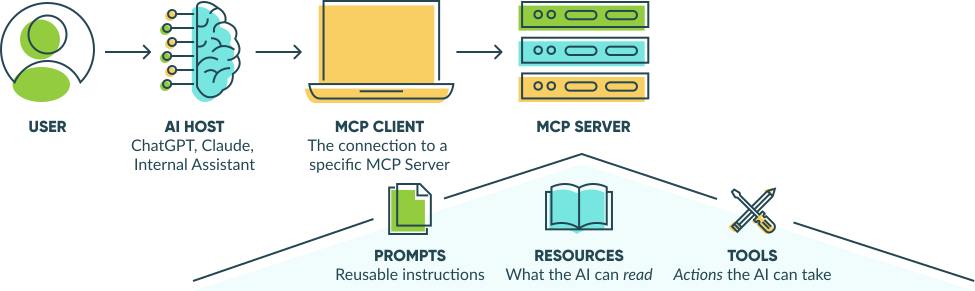
In practice, an MCP server may expose three kinds of capabilities:
- Tools: Actions the AI can take, like searching records or triggering a Workflow step.
- Resources: Data the AI can read, like submissions, notes, or documentation.
- Prompts: Reusable instructions that guide how the AI uses those tools and resources.
Each MCP server exposes its own set of tools. One connector may let an assistant search and summarize data, while another may allow updates or workflow actions.
Here is what that looks like in real life.
Say you ask your AI app:
“Find the intake form submissions from last week and summarize the common issues.”
Without MCP, the AI can only work with what you paste into the chat. With an MCP server connected to your form platform, the AI can access the relevant submissions, read them, and give you an answer based on real data.
Same request. Completely different result.
How an MCP Server Works
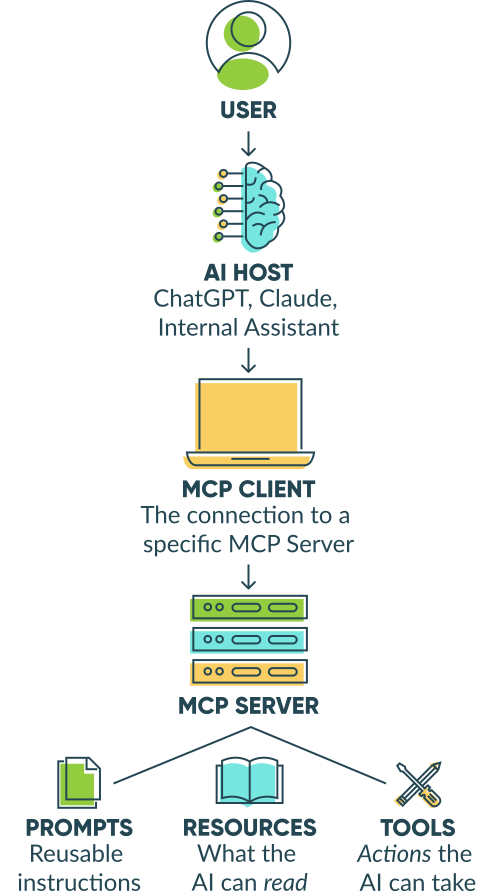
An MCP setup has three parts:
-
Host: The AI app you are using, such as Claude Desktop, ChatGPT Desktop, Cursor, Copilot Studio, Windsurf, or another MCP-compatible app.
-
Client: A dedicated connection inside the host app that links to one specific MCP server. A host can run multiple clients at the same time, one per server.
-
Server: The bridge to a specific external system. It tells the AI app what that system can do and handles the actual requests.
Here is the plain-English version: you ask the AI app for something. The app uses the right client to reach the right server. The server responds, and the AI app uses that response to complete the task.
If the AI app is connected to several systems at once, it uses separate MCP clients for each one.
How MCP Differs From APIs and Automation Platforms
MCP makes more sense when you put it next to the integration tools teams already know.
An API is a direct interface between two pieces of software. It is specific to one service and built for developers to write code against. With a public API, someone has to choose the right endpoint, handle authentication, format the request, and connect the result to the next step.
An automation platform, like Zapier, is a prebuilt link between specific products. It is easier to use than a raw API, but it is usually built around predefined triggers and actions.
An MCP connector, pre-built MCP connections, are different because the thing using it is an AI assistant. The connector gives the assistant a structured way to understand what it can access, which actions are available, and when to use them based on your request.
| Pattern | What It Is Best For | Simple Version |
|---|---|---|
| API | Custom software integrations | “Let one system ask another system for something.” |
| Automation platform / iPaaS | Repeatable no-code workflows | “When this happens in one app, do that in another.” |
| MCP connector | AI-assisted work across tools and data | “Let the AI understand what it can use, then act through the right system.” |
MCP doesn’t replace APIs, webhooks, or tools like Zapier. It is a different pattern for AI-powered work.
If the task should happen the same way every time, use a traditional integration or workflow tool. If the task depends on context and you want an AI assistant to help in the moment, using an MCP connector may be the better fit.
When Do You Actually Need an MCP Connector?
Most teams will not need to build an MCP server themselves. More often, the decision is whether to use an existing MCP connector, usually from a software vendor or platform your team already relies on.
An MCP connector is worth considering when an AI assistant needs to work with business systems in a flexible, conversational way. It is a stronger fit when:
- The AI app needs access to internal tools or data.
- The same connection should work across more than one AI app.
- The assistant needs to choose from available actions, not follow one fixed workflow.
- Context from a back-and-forth conversation matters.
- A vendor-maintained connection is preferable to a custom integration.
If those are not true, a regular API, webhook, or automation platform tool is probably still the better fit.
Five Ways Teams Are Using MCP Today
Most early MCP examples come from developer workflows. Business teams are more likely to encounter MCP in everyday work like this:
- Answer policy questions faster
Instead of digging through docs, someone could ask an AI app to search approved policy pages and summarize the answer from the source material. - Get ready for a customer call
An assistant could pull recent customer touchpoints and turn them into a short brief before the meeting. - Turn research into usable records
A team member could collect details from another source, then ask the assistant to add them to a form, spreadsheet, CRM, or tracking system in a consistent format. - Find the right document
Instead of remembering the exact file name, someone could describe the contract, policy, or file they need and let the connected system help search. - Make sense of form responses
An AI app connected to structured form data could fetch form responses, spot patterns, and answer follow-up questions about data without exporting a spreadsheet.
If you have used an AI tool to generate a form, this is the same general idea, but in the other direction: instead of using AI to help create the form, the AI helps make sense of the form data.
Security: The Part Your CTO Will Ask About
An MCP server can do real things inside the systems it connects to. It may read data, update records, or take actions on a user’s behalf. That is what makes it useful, and it is also why it should be reviewed before it touches important business data.
The MCP spec uses familiar security patterns, like sign-in flows, permission scopes, and token controls. But the spec is only the blueprint. The actual server still has to be built, configured, and maintained well.
The basic rule is the same as any other integration: know what it can access, what it can do, and whose permissions it uses.
Recent MCP security disclosures are a reminder to ask practical questions before connecting a server to customer records, form submissions, payment data, or internal documents:
-
What can this server access?
Is it read-only, or can it create, edit, send, delete, refund, approve, or publish things? -
Who is it acting as?
Does the AI use each person’s own permissions, or does it share one powerful service account? -
How are permissions limited?
Can access be scoped to specific folders, forms, records, workspaces, or actions? -
Can you see what actions were made?
Is there an audit log showing which user triggered which tool call, with what data, and when?
Start with the access it needs, and make sure someone can explain exactly what it is allowed to do.
Most platforms that build MCP connectors let users control which forms, fields, data, and actions a connected AI assistant can access.
How This Fits with How You Connect Forms Today
Form data is where a lot of work begins: a new lead comes in, an application needs review, a request needs routing, or a response points to something worth following up on.
The Cognito Forms MCP Connector lets supported AI apps work with that data directly. Instead of exporting entries, copying responses into chat, or piecing together details by hand, you can ask your assistant for specific help: summarize a filtered view, find patterns, pull supporting files, update a submission, or add new records from information you provide.
The connector works through the permissions, validation rules, and entry views your organization already uses, so your AI assistant can only work with the form data you choose to make available.
The Cognito Forms MCP Connector is available now in the ChatGPT app store and in the Claude connectors directory.
Frequently Asked Questions
An MCP server is the bridge between an AI app and an external source of tools or data. It tells the AI app what it can access, what actions it can take, and how to make those requests.
An API lets software systems exchange data through specific endpoints. An MCP server often uses APIs underneath but adds a layer that lets AI apps discover and use available tools or data consistently.
No. APIs, webhooks, Zapier, Power Automate, and other iPaaS tools are still useful for integrations and predefined workflows. MCP is designed for AI-assisted workflows, where an assistant needs context and flexible access to tools or data.
The Cognito Forms MCP Connector can help supported AI apps work with existing forms and entry data. It is useful for tasks like summarizing entries in a view, finding patterns across responses, creating or updating submissions, retrieving files and documents, and analyzing entry data. It is separate from the AI Form Generator and does not replace Cognito Forms workflows or other automation tools.

Miranda Peterson
Miranda is a Marketing Specialist at Cognito Forms who loves turning complex ideas into content that’s clear, helpful, and human. Outside of work, you can find Miranda enjoying local coffee shops, spending time in nature with her husband and two children, reading on her Kindle, or cooking for a group of friends.