Annual plans are currently available to select organizations, with wider availability coming soon.
Annual plans let you pay for Cognito Forms once a year at a lower rate than monthly billing, with a few key differences:
- 12-month commitment. Annual plans are non-cancelable for the length of the term.
- Usage Wallet. Instead of a flat monthly bill, you fund a wallet that covers usage, such as guests, storage, custom document templates, and other add-ons, for the term.
- Committed users. Additional users beyond what’s included in your subscription plan are committed for the rest of the term, even if you later remove them. These users are billed to your card on file on the following monthly invoice.
Starting an annual plan
To sign up for an annual plan:
-
Find your organization’s name in the top left corner of the sidebar and select Settings.
-
Select Plan & Billing in the left-hand navigation. At the top of the page, you’ll see a toggle to switch between Annual and Monthly. Annual is selected by default.
-
Choose the plan level you want and select Get Started.
-
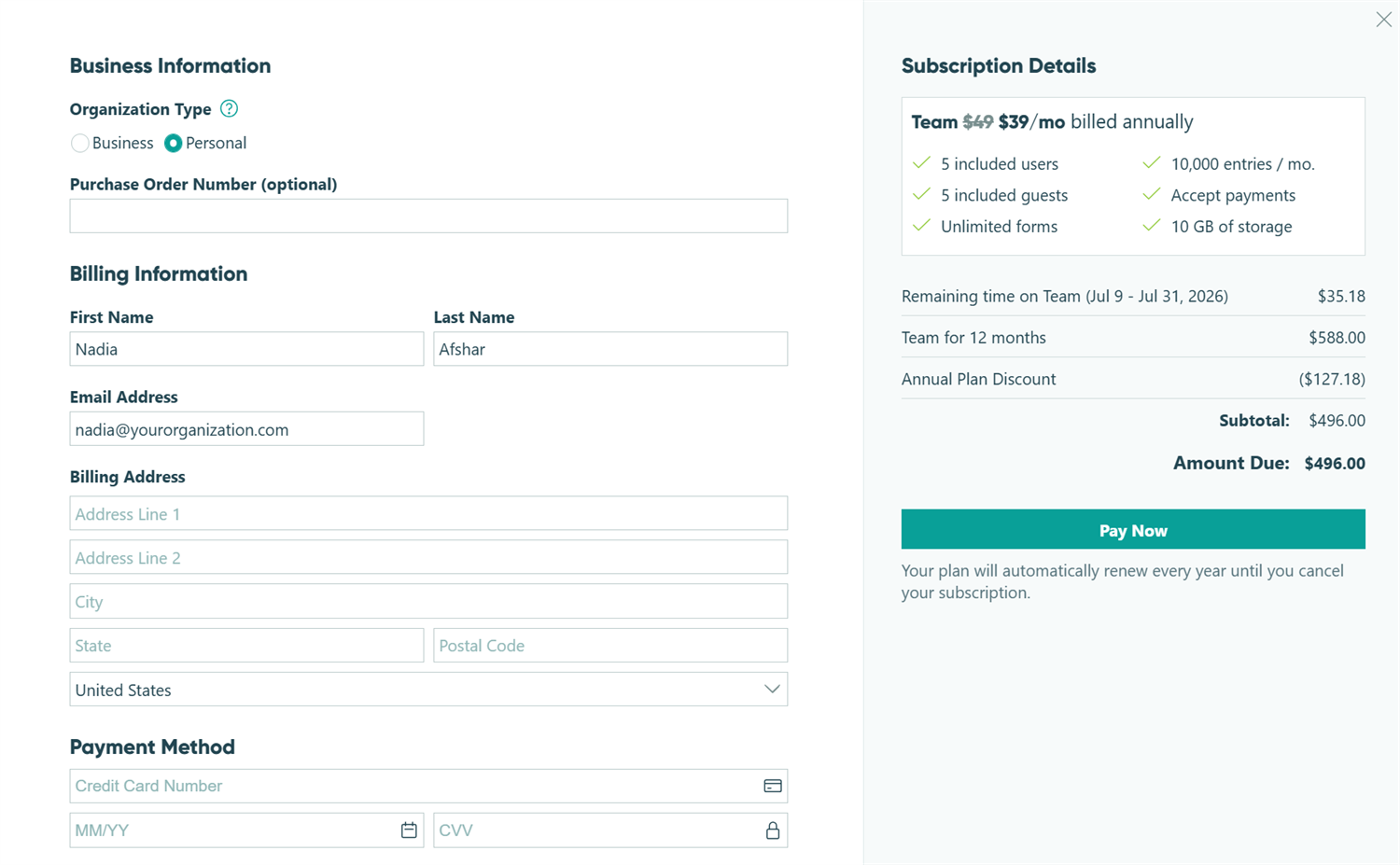
Select Business if your organization is a business, non-profit, or government entity, and enter your Business Name and EIN/VAT Number (if applicable). Otherwise, select Personal.
-
Enter your Name, Email Address, Billing Address, and Payment Method.
-
If your organization has additional users beyond what’s included in your plan, or usage history that suggests a wallet funding amount, you’ll see a Customize step. Review and adjust these before checking out.
-
Click Pay Now to complete checkout.
Your annual plan becomes active as soon as payment is confirmed. If your card is declined, you’ll stay on the checkout screen to update your payment details and try again.
Converting from monthly to annual
You can switch from a monthly plan to an annual plan at any time from Plan & Billing.
- Find your organization’s name in the top left corner of the sidebar and select Settings.
- Select Plan & Billing in the left-hand navigation.
- Choose the annual plan level you want and select Convert to Annual.
- Review your Customize step, if shown, and complete checkout.
In most cases, your annual plan starts immediately after checkout. If you’re converting to the annual version of a lower plan tier than your current Monthly plan, the conversion is scheduled for the first of next month instead. You’ll keep your current Monthly plan until then.
Either way, you won’t lose access to your current plan while a conversion is pending, and we’ll never show your new plan as active until it actually is.
Usage Wallet
The Usage Wallet lets you estimate your monthly usage and add funds upfront, so you can avoid getting a separate invoice each month. Funds are only deducted from your Usage Wallet based on your actual monthly usage.
You can add funds to your Usage Wallet for:
- Guests
- Custom document templates
- Storage
- API usage
- Additional funds (a fixed annual amount added to your wallet balance)
When you start or convert to an annual plan, you’ll set an initial wallet target. During your term, you can add funds at any time if your balance is running low, and this takes effect immediately. If your balance drops below the recommended level, you’ll see a low-balance notice with guidance on how much to add.
Your wallet target for your next term is managed separately, under Renewal Details (see below). Adding funds during your current term doesn’t change what you’re set up to pay at renewal.
Renewal Details
Renewal Details show you what your annual plan will look like when it renews for another 12-month term, including plan level, committed users, and wallet target.
- If your renewal date is more than two months away and you haven’t scheduled any changes, you won’t see Renewal Details yet.
- Once your renewal date is within two months, Renewal Details appear automatically so you can review and adjust your upcoming term. If you’ve already scheduled changes for your next term, you’ll see them here, along with your renewal date.
Any changes you make to Renewal Details take effect at your next renewal. They never affect your current term, and we’ll always be clear that these changes are scheduled, not active yet.