To comply with local tax regulations, Cognito Forms is now registered to collect sales tax in the following US states:
- Connecticut
- DC
- Hawaii
- Kentucky
- Louisiana
- Maryland
- Massachusetts
- Ohio
- Pennsylvania
- Rhode Island
- South Carolina
- Tennessee
- Texas
- Utah
- Vermont
- Washington
- West Virginia
If your billing address is in one of these states, you may see additional charges on your Cognito Forms invoices. These charges reflect state tax regulations for digital services and will vary by state. If you need to verify that your billing details are up to date, please refer to our help guide.
If your billing address is outside the listed states, this change won’t apply to you. If your organization is exempt from sales tax, please contact our support team with your exemption letter to avoid tax charges.
Each plan level will include the following number of API requests per month:
- Pro plan - 2,000/month
- Team plan - 10,000/month
- Enterprise plan - 100,000/month
These charges (if applicable) will appear on your organization’s monthly invoice. If you exceed the number of included monthly requests, you’ll be charged $20 per bucket of 100,000 requests. You can monitor your integration usage on your organization’s settings page.
Please note that large requests (over 100KB) are counted as multiple requests. For example, a 150KB request will count as two requests and a 400KB request will count as 4 requests. For Microsoft Power Automate connections created before April 8, 2024, you can stop sending file data and/or signature data to decrease request sizes.
Learn more about our data integration features.
Absolutely! All of our paid subscription plans include the ability to invite multiple users:
- Pro plan: 2 users
- Team plan: 5 users
- Enterprise plan: 20 users
You can also add an unlimited number of additional users for just $5/user/month. Learn more about our pricing plans.
Yes! When you sign up for an annual plan, you pay a lower rate than monthly billing. Any additional usage during your term, like guests, storage, or API usage, is covered through your usage wallet.
Learn more about annual plans.
If you sign up for a free trial of a Cognito Forms plan, you won’t be charged anything for the first 14 days. When your trial ends, your organization will automatically move to the free Individual plan unless you’ve provided billing information.
To end your free trial at any time:
- Find your organization’s name in the top left corner of the sidebar and select Settings.
- Select Plan & Billing in the left-hand navigation.
- Click End Trial in the top right corner.
In many cases, yes. We offer discounted rates on any of our plan levels for non-educational, non-governmental organizations that are tax-exempt under section 501(c)(3) of the Internal Revenue Code.
If you run a non-profit organization and would like to apply for discounted rates, please contact our support team.
Yes! You can change your plan at any time – even if you’re on an annual plan.
Upgrade or downgrade your plan from your organization settings. Upgrades take effect immediately, giving your organization instant access to the new features. Any price difference will be prorated based on the time remaining in your current billing period.
If you’re on a monthly plan, a downgrade takes effect at your next billing date. If you’re on an annual plan, you can schedule a downgrade to take effect at your next renewal.
Learn more about annual plans.
You can upgrade your Cognito Forms organization at any time to experience advanced features and take advantage of any special pricing opportunities, whether you’re on a monthly or annual plan.
Refer to our help guide for step-by-step instructions on how to change your monthly plan, or see annual plans to learn more about paying annually.
While you can create an unlimited number of organizations using the same user account, each organization is considered a stand-alone entity and is on a separate billing plan.
Each new organization must be signed up on its own billing plan in order to access the premium features of our paid subscription levels.
To view your organization’s past invoices:
- Find your organization’s name in the top left corner of the sidebar and select Settings.
- Select Plan & Billing in the left-hand navigation.
- Find the Billing History section and select a date to view/download the invoice from that month.
A user is someone who can build forms, edit form entries, or view form entries depending on their assigned user permission level. In order to invite additional users to your organization, you must have either Owner or Administrator permissions.
You can also invite additional users above the number included with your plan. Your account will be charged per additional user/month for each user above the amount included on your plan level. See our Pricing for details.
Yes! With an annual plan, you pay once a year at a lower rate than monthly billing. Your usage wallet covers anything extra, like guests, storage, or API usage, so you won’t get a separate invoice each month.
Learn more about annual plans.
While we currently do not support bank transfer payments, we offer three other ways to pay for your Cognito Forms subscription:
- Credit Card: When you upgrade your plan, select Credit Card as your payment method.
- Invoice: Select Invoice as your payment method to prepay for your plan by invoice.
- PayPal: We also offer the option to prepay by invoice with a PayPal payment. If you’re interested in paying through PayPal, please contact us for more information.
What happens when your Cognito Forms trial ends depends on whether you added a credit card:
If you added a credit card during your trial, your card will be charged the monthly subscription rate for the plan you trialed, and you’ll continue using all the features and benefits of that plan.
If you didn’t add a credit card, your organization automatically downgrades to the free Individual plan.
You can upgrade or downgrade your plan at any time after your trial ends.
If your card was declined when subscribing to Cognito Forms, make sure the card information you entered is accurate and confirm that your card has not expired.
If your card was declined while renewing your subscription plan (in the normal course of billing), please ensure that your billing information is up to date.
While you can purchase credits for up to 24 months of Cognito Forms service, we do not automatically renew plans that have been paid for using these credits.
If your organization has prepaid for 12-months and you would like to continue your plan for another year, you can renew by prepaying again.
If you prefer auto-renewal, however, you can subscribe for a monthly plan. Those plans will auto-renew indefinitely.
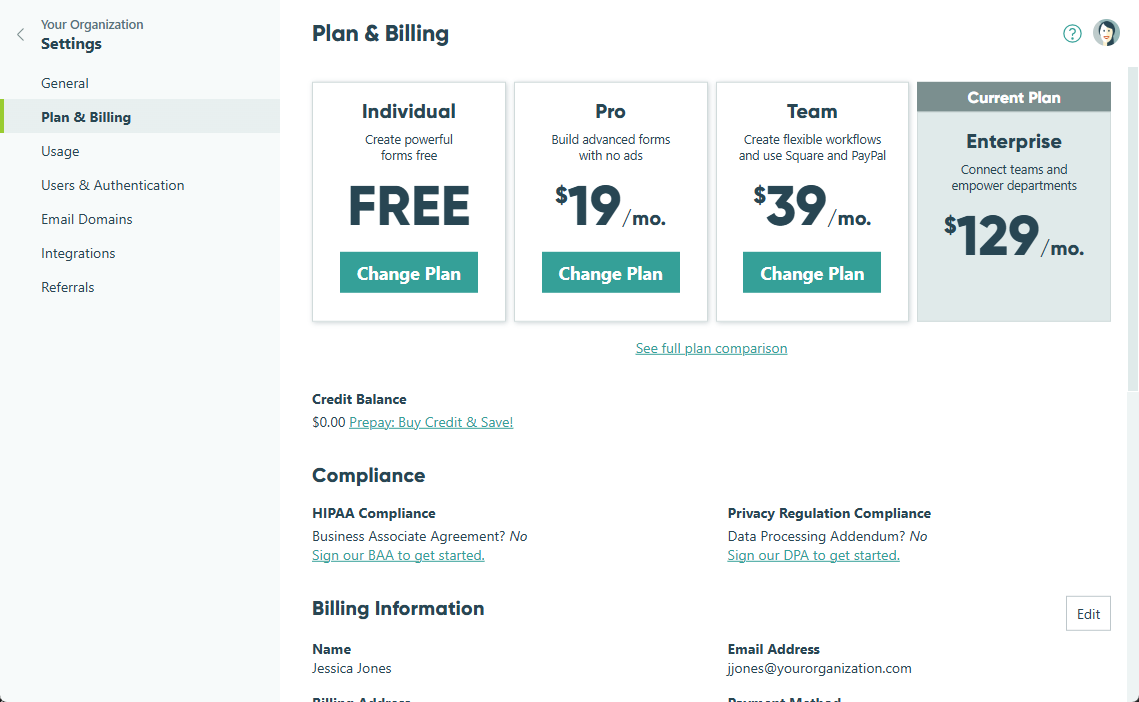
To cancel your paid Cognito Forms subscription, you will need to change your monthly plan to the free Individual plan.
To change to an Individual plan:
-
Find your organization’s name in the top left corner of the sidebar and select Settings.
-
Select Plan & Billing in the left-hand navigation.
-
Find the Individual plan level and select the Change Plan button. In the dialog that appears, enter your reason for downgrading and select Downgrade. Your subscription will now be switched to the free Individual plan.
When you exceed your plan limits, here’s what will happen:
- Entries: Excess entries will continue to be collected, but access to them will be locked. Additionally, excess entries will not trigger any email notifications or integrations. To unlock these entries, simply upgrade to a plan level with the necessary entry capacity within the next 30 days. (After 30 days, you’ll no longer have access to the locked entries.)
- Storage: Uploaded files will continue to be collected, but access to them will be locked. To unlock these files, either upgrade to a plan level with enough storage or delete any entries with attached files.
- Users: If you downgrade to a free Individual plan, excess users will lose access to the organization and not be able to manage forms or entries. On all other plans, excess users will automatically be billed per additional user/month for each user above the amount included on your plan level. See our Pricing for details.