If your forms collect personal data from anyone in the EU, GDPR applies to your business, regardless of where you’re located. Here’s how to configure your online forms to meet the key requirements.
Build Time & Skill
15-20 min
Beginner
What you'll learn
How to set up your forms to meet core GDPR requirements: privacy policy linking, explicit consent, data encryption, data minimization, and handling respondent data requests
The General Data Protection Regulation (GDPR) gives individuals in the European Union control over their personal data. If your forms collect names, email addresses, or any other identifying information from EU residents, GDPR applies to you, even if your business operates entirely outside of Europe.
Cognito Forms handles the platform-level compliance for you. We are certified under the EU-US Data Privacy Framework, encrypt all data in transit, and both our Terms of Service and Privacy Policy meet GDPR standards. Your job is to configure your individual forms correctly. This GDPR compliance guide walks you through exactly how to do that, step-by-step.
By ensuring your forms are GDPR-compliant, you will:
- Build trust with clients and customers who share sensitive personal information with your business.
- Protect your organization from significant fines, which can reach up to €20 million or 4% of annual global revenue.
- Stay covered across your most common form types, like client intake, patient forms, service requests, and lead capture.
- Give respondents confidence that their data is collected responsibly and handled with care.
Understanding GDPR: What It Means to Be Compliant
What does it mean to be GDPR compliant? At its core, it means your organization collects personal data from EU residents lawfully, transparently, and securely, and gives those individuals control over their own information. If you use online forms to collect names, emails, addresses, or any other identifying information from EU residents, GDPR governs how you collect, store, and manage that data.
Three terms come up often in GDPR discussions. Here’s what they mean for you, as someone collecting data via online forms:
- Data subject: The person filling out your form. They have rights over their own personal data, including the right to access it, correct it, or request that it be deleted.
- Controller: You, the form owner. You decide what data to collect and why. This makes you responsible for ensuring your forms are compliant.
- Processor: Cognito Forms. As your data processor, Cognito Forms handles and stores form submission data on your behalf, in compliance with GDPR requirements.
This distinction matters because your obligations as a controller are separate from Cognito Forms’ obligations as a processor. Cognito Forms meets its responsibilities through its EU-US Data Privacy Framework certification, SSL encryption for all data in transit, and a GDPR-compliant Privacy Policy.
Your GDPR Compliance Checklist: 5 Steps to Compliant Forms
Making your forms GDPR compliant comes down to five actions, with each step mapping directly to a feature inside Cognito Forms:
| What is required | Feature used | Step in this guide |
|---|---|---|
| Linked privacy policy | Content field with linked text | Go to Step 1 → |
| Explicit opt-in giving consent | Yes/No field, checkbox type | Go to Step 2 → |
| Data encryption | Protecting fields | Go to Step 3 → |
| Only collect the data you need | Required fields | Go to Step 4 → |
| Let respondents correct or delete data | Entry editing or deleting | Go to Step 5 → |
Step 1: Add a GDPR compliant privacy policy link to your form
GDPR requires that your privacy policy be written in plain language and easy for respondents to find. The best place to put it is directly on your form, before anyone fills it out.

In Cognito Forms, use the Content field to add a clickable link:
- On the Build page, add a Content field to your form.
- Position it above your first data-collection field so respondents see it before they begin.
- Click the URL icon in the Content field’s formatting toolbar.
- Enter the URL of your privacy policy page.
- Write a brief, plain-language description alongside the link. For example: “By submitting this form, you acknowledge our [Privacy Policy].”
Name Cognito Forms as your data processor in your privacy policy. GDPR requires you to disclose which third-party services process your respondents’ data. You can paste this ready-made statement into the relevant section of your privacy policy, typically under “Third-Party Data Processors”:
“We use Cognito Forms to securely collect and manage your personal information in compliance with GDPR. You can learn more about how Cognito Forms protects your personal information in the Cognito Forms Privacy Policy.”
Step 2: Meet GDPR consent requirements with an explicit opt-in
GDPR consent requirements are clear: you must receive an active opt-in before collecting personal data. Each respondent must take a deliberate action (such as checking an unchecked box) to give their consent. Pre-filled or pre-checked checkboxes do not meet the standard.

In Cognito Forms, use a Yes/No field to collect consent:
- On the Build page, add a Yes/No field to your form.
- In the field settings, change the Type to Checkbox.
- Write a clear consent statement in the field label. Set the Require Yes Response option to Always, so the form cannot be submitted without consent.
- Leave the checkbox unchecked by keeping Default to No.
Here are a few GDPR consent form examples you can adapt for your own forms:
- General data collection: “I agree to the collection and use of my personal information as described in the Privacy Policy.”
- Email marketing: “I agree to receive marketing communications from [Your Company]. I understand I can withdraw my consent at any time.”
- Sensitive data (health, medical): “I consent to the collection and processing of my health information for the purpose of [specific purpose], as described in the Privacy Policy.”
Keep in mind that should you choose to not obtain explicit consent, your organization must comply with at least one of the other listed requirements for lawful data processing under the GDPR.
Important note on sensitive data categories: The GDPR requires explicit consent when collecting data specified under certain categories, including racial or ethnic origin, political opinions, genetic data, and more. If your form collects any of these, your consent language should specifically reference the type of sensitive data being collected.
Step 3: Enable data encryption on your form
Cognito Forms automatically uses SSL encryption for all data in transit. This applies to every form, for every user, at all times. However, if your form collects sensitive personal data (such as Social Security numbers, medical information, financial details, or any of the special categories listed above) you also need to enable data encryption at rest.

Data encryption
To enable additional encryption in Cognito Forms:
- Open your form and go to Settings.
- Find Data Encryption and toggle it on. This encrypts all sensitive data stored in Cognito Forms using 256-bit AES encryption.
Once encryption is enabled, you can protect individual fields. A protected field is encrypted and excluded from notification and confirmation emails, keeping sensitive data inside your Cognito Forms account only.
Protecting fields
Use field protection for any data you wouldn’t want sent in an email. Things like ID numbers, health details, or financial information should be protected so they never appear in automated notifications. After enabling additional encryption for the entire form:
- Open the specific field you want to protect.
- Check the box next to Protect this field?.
- Repeat steps 1-2 for any other fields.
Step 4: Only collect the data you need
GDPR’s data minimization principle requires that you collect only the personal data necessary for the specific purpose of your form. Collecting extra information “just in case” creates compliance risk and gives respondents reason to distrust your process. Additionally, shorter forms tend to get higher completion rates. Minimizing data collection is both a compliance requirement and a usability improvement.
A few practical habits to keep your forms lean:
- Remove fields that aren’t essential. Before adding a field, ask yourself: do I genuinely need this information to fulfill the purpose of this form? If not, leave it out.
- Mark only truly necessary fields as required. In each field’s settings, use Require This Field only for information you can’t do without.
- Use Help Text to explain why each field is needed. Adding a brief explanation beneath a field shows respondents you have a clear reason for asking and makes your data collection practices transparent.
- Delete data when it’s no longer needed. GDPR requires you to remove personal data once it has served its purpose. Build a habit of reviewing your entries periodically and deleting records that are no longer relevant.
Step 5: Give respondents the ability to correct or delete their data
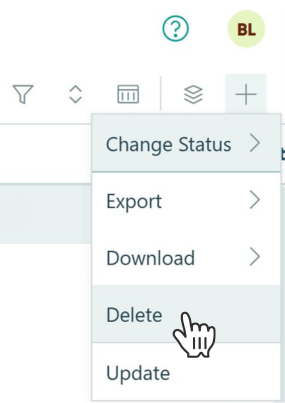
Data subjects have a legal right to access, correct, and erase their personal data. As the controller, you are responsible for honoring these requests. Cognito Forms gives you two ways to do this.
Option A: Edit or delete entries directly from the Entries page
If a respondent contacts you requesting a change or deletion:
- Go to the Entries page for your form.
- Find the respondent’s submission.
- To correct data: Click into the entry, update the relevant fields, and click the “Update” Action button to save your changes.
- To delete data, select the entry, click Actions, and choose Delete.
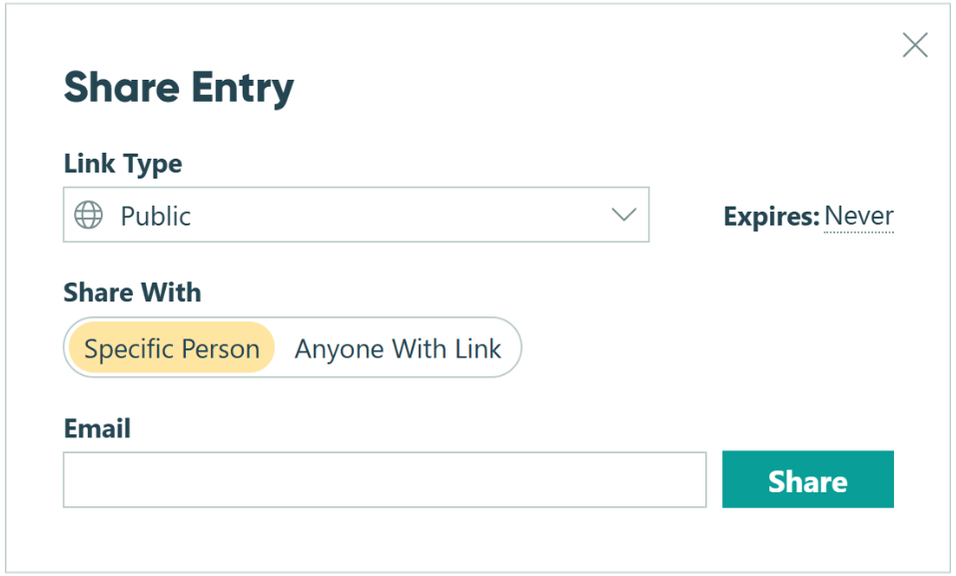
Option B: Send the respondent an entry edit link
You can give respondents a secure link to update their own information directly, without contacting you:
- Go to the Entries page.
- Find the respondent’s submission.
- Click the Share button, and copy the entry edit link.
- Send the link to the respondent so they can make corrections themselves.
For forms that commonly receive update requests (such as client onboarding forms or event registrations), consider including a Workflow Link in an automated confirmation email. Workflow Links give respondents immediate self-service access to their data, reducing the burden on your team and improving the respondent experience.
Additional Ways to Strengthen Your Data Practices
Once your five core steps are in place, these additional measures help you build a more thorough and sustainable approach to data compliance:
- Limit internal access to sensitive entries. Use the Shared With Current User filter on your Entry Views to ensure that only the team members who genuinely need access to sensitive data can see it in the Entries page.
- Enable HIPAA-Compliance if you collect personal health information. Cognito Forms offers HIPAA compliance through business associate agreements (BAA), making it easy to build medical forms.
- Require additional login verification. Use our features like Two-Factor Authentication (2FA) or Single Sign-On (SSO) for added security on team members logging in to your Cognito Forms organization.
Start Building GDPR-Compliant Forms Today
GDPR compliance doesn’t have to be complicated. Cognito Forms handles the platform-level requirements, and your job is to configure your forms correctly. After working through the five steps above, you’ll have the core requirements in place: explicit consent, encrypted data, a visible privacy policy, minimal data collection, and a process for honoring respondent rights. If you have specific questions about your organization’s legal obligations, we recommend consulting legal counsel for organization-specific obligations.
Start with a template
Want to start building forms? Check out our template gallery, filled with forms for any need. Each one is fully customizable to fit your needs.
View templatesFAQ
Yes. GDPR applies to any organization that collects personal data from EU residents, regardless of where that organization is located. If someone in the EU fills out your form and provides their name, email, or any other identifying information, GDPR applies to that data and to how you handle it, even if your business operates entirely outside of Europe.
If you’d like to learn more or determine whether or not GDPR applies to you, we recommend reading more on the official GDPR website.
Yes. If you are required to be GDPR-compliant, you are required to sign a Data Processing Agreement. This is an agreement between any organization collecting EU personal data and the third-party processors it uses.
Cognito Forms provides a standard DPA that you can sign from the Plan & Billing section of your organization’s settings. Completing this step fulfills a specific GDPR requirement and documents the legal relationship between you and Cognito Forms as controller and processor.
The controller decides what personal data to collect and why. The controller is you, the form owner. The processor handles that data on the controller’s behalf. The processor would be Cognito Forms. You are responsible for configuring your forms to be GDPR compliant. Cognito Forms is responsible for securely storing and managing the data you collect through its platform.