
Zapier is a no-code automation platform that connects to thousands of apps, including popular tools like Salesforce, Google Drive, Mailchimp, OneDrive, SugarCRM, Trello, QuickBooks, and Dropbox. It allows teams to pass data and trigger actions without writing code.
Connecting Zapier to Cognito Forms turns new entries into triggers that automatically create records, send notifications, and update the right systems.
- Cut manual data entry
- Accelerate lead handoff
- Keep records consistent
Use this integration to:
- Create or update CRM records
- Add rows to sheets and databases
- Send emails, messages, and alerts
Triggers
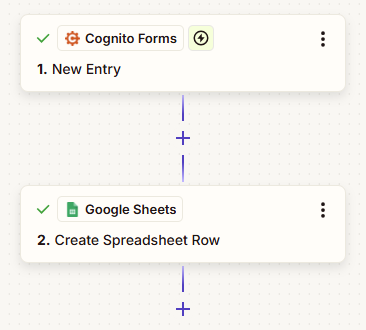
Triggers are events in Cognito Forms that start a Zap:
- New Entry – When someone submits a form, automatically create CRM records, add rows to spreadsheets, send notifications, or update other systems
- Update Entry – When an entry is updated, sync changes to connected apps
- Entry Deleted – When an entry is removed, trigger cleanup actions in other systems
Actions
Actions are what you can do in Cognito Forms from other apps:
- Create Entry – Generate new form submissions from spreadsheet rows, CRM records, or other data sources
- Update Entry – Modify existing entries when data changes in connected systems
- Delete Entry – Remove entries when they’re no longer needed
- Set Form Availability – Control when forms are open or closed based on external triggers
- Get Document – Retrieve custom documents and PDFs generated by your forms
- Get Entry or Get Form Entries – Pull entry data for reporting and analysis
Popular Zaps
Get started faster with these commonly used automations:
How It Works
- Authenticate with Zapier
- Sign in or create a Zapier account
- Authorize Zapier’s connection to your forms
- In Cognito Forms, navigate to Organization Settings > Integrations to give access
- Create a Zap in Zapier
- Set Cognito Forms as your trigger (e.g., “New Entry”)
- Pick your desired action app and map fields accordingly
- Test and enable
- Submit a test form entry
- Verify the data flows correctly, then enable the Zap
Still need help? Check out our Zapier support article.
FAQs
Yes! You can create separate Zaps for each form you want to connect. When setting up a Zap, you’ll select which specific form should trigger the automation. This lets you route different forms to different apps or workflows – for example, sending contact form entries to your CRM while logging event registrations to a spreadsheet.
Yes, you can use Zapier’s Filter or Paths features to create conditional automations. For example, you could set up a Zap that only triggers when a priority field is marked “Urgent” or when an order total exceeds a certain amount. This is configured in Zapier after you’ve selected Cognito Forms as your trigger, allowing you to add logic based on any field in your form.
You can view Zapier-related activity in two places:
- In Cognito Forms: Check the entry audit log to see when Zapier actions were triggered, the status of the integration, and details if an action failed
- In Zapier: View your Zap History to see all recent runs, successful triggers, and any errors that occurred